
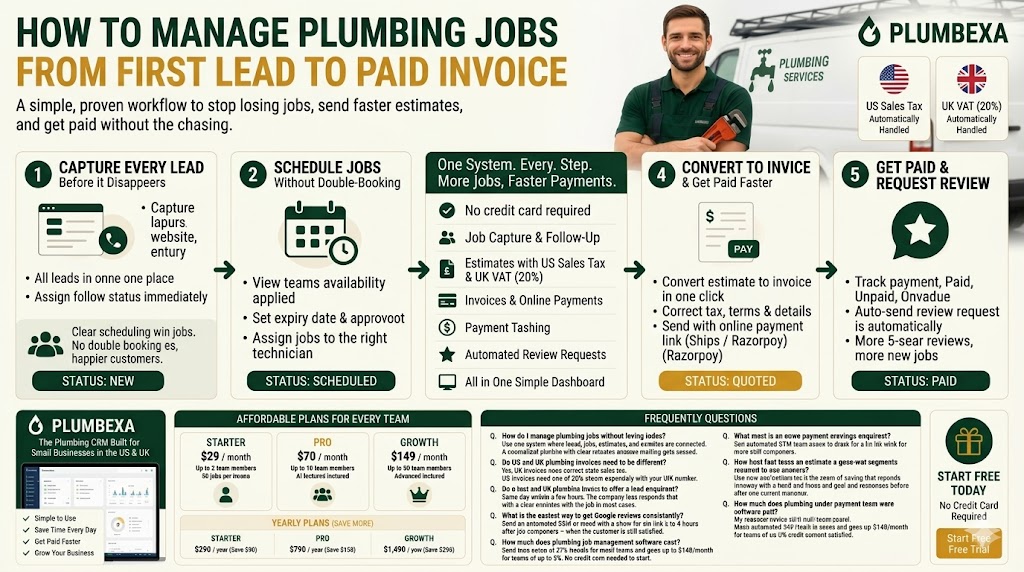
How to Manage Plumbing Jobs from First Lead to Paid Invoice (US & UK Guide)
Running a plumbing business is easier when every lead, job, estimate, and invoice is managed in one place. This practical US & UK guide shows how to streamline your workflow, avoid missed opportunities, send faster estimates, schedule jobs efficiently, and get paid quicker using modern plumbing CRM software. Learn the step-by-step process that helps plumbing businesses save time, increase bookings, and improve customer satisfaction.
How to Manage Plumbing Jobs from First Lead to Paid Invoice (US & UK Guide)
Discover the best plumbing CRM software to manage your jobs - from the first lead to the final paid invoice. If you are running a small plumbing business in the US or UK, this guide gives you a practical, step-by-step workflow to stop losing jobs, send faster estimates, and get paid without the chasing.
Whether you operate solo in Birmingham or manage a five-person crew in Houston, this process works — and the right software makes every step faster.
Step 1 - Capture Every Lead Before It Disappears
Most plumbing businesses lose jobs not because they did bad work, but because an enquiry fell through the cracks. A missed call, an unanswered contact form, a note scribbled on paper and forgotten - these are the silent revenue killers.
A reliable plumbing job tracking software starts with centralised lead capture. Every enquiry - whether it comes from your website form, a phone call, or a manual entry - should land in one place with a clear status: New, Contacted, Quoted, Won, or Lost.
Practical steps:
- Add a lead capture form to your website that feeds directly into your job management system
- Log every call manually if it does not come through a form
- Assign each lead a follow-up status immediately - never leave it as "unknown"
Speed matters here. Responding to a new lead within 15 minutes dramatically increases the chance of booking the job. A centralized lead pipeline means your team always knows who to call next.
Step 2 - Schedule Jobs Without Double-Booking
Once a lead is qualified, it becomes a job. This is where field service workflow management either works smoothly or causes chaos.
The most common problems at this stage:
- Two technicians booked for the same time slot
- No clear record of which technician is assigned to which job
- Customers not notified of their appointment
A proper job scheduling system lets you assign jobs to specific technicians, view their availability on a calendar, and track job status in real time - from Scheduled to In Progress to Completed.
For UK teams, this means handling jobs across multiple postcodes efficiently. For US teams running multiple technicians across a city, clear dispatch records prevent expensive double-booking mistakes.
Practical steps:
- Use a shared job calendar visible to all team members
- Set job statuses and update them as work progresses
- Ensure each technician only sees jobs assigned to them
Step 3 - Send Professional Estimates on the Same Day
Slow estimates lose jobs. A customer who calls three plumbing companies and gets one estimate back the same day will almost always go with that company - regardless of price.
Job scheduling for plumbers and estimate creation should be connected in the same system. When a job is created, you should be able to generate a professional estimate in minutes, not hours.
Key things your estimate should include:
- Itemised breakdown of labour and materials
- Correct tax handling - US Sales Tax for American clients, UK VAT (20%) for British clients
- A clear expiry date to encourage faster decisions
- An easy way for the customer to approve or request changes
For businesses operating across both markets, tax compliance is non-negotiable. An estimate sent to a Manchester customer without VAT, or one sent to a Dallas client with incorrect sales tax, creates problems down the line.
Step 4 - Convert Estimates to Invoices Instantly
Once the job is done, the estimate should convert to an invoice in one click. Re-entering the same data wastes time and introduces errors.
Invoice management for trade businesses works best when it is connected to the full job record - so the invoice already contains the customer details, job description, tax rate, and agreed price. All that remains is sending it.
For UK plumbing businesses, invoices need to clearly show:
- VAT number (if VAT registered)
- VAT amount broken out separately
- Payment terms
For US plumbing businesses:
- Correct state sales tax applied
- Clear payment due date
- Accepted payment methods
Sending invoices with an online payment link significantly reduces the time between job completion and payment received. Customers can pay by card immediately rather than waiting to write a cheque or set up a bank transfer.
Step 5 - Get Paid and Request a Review
After an invoice is sent, your system should allow you to track payment status - paid, unpaid, or overdue - without manually checking your bank account.
Once payment is confirmed, that is the ideal moment to request a Google review. Plumbing business automation at this stage - sending an SMS or email with a direct review link - consistently produces more reviews than asking in person, because it removes friction for the customer.
A single automated review request sent 2 to 4 hours after job completion, while the customer is still satisfied, works better than any other method.
How Plumbexa Handles This Entire Workflow
Plumbexa is built specifically for small plumbing businesses in the US and UK. The platform covers every step above - lead capture, job scheduling, estimates, invoices with correct US Sales Tax or UK VAT, online payment links via Stripe or Razorpay, and automated review requests - in one dashboard.
Pricing starts at $29/month (Starter - up to 2 team members, 50 jobs/month). The Pro plan at $79/month supports up to 10 team members with AI features included. For growing teams, the Growth plan at $149/month covers up to 50 team members. Yearly plans save you money - Starter at $290/year, Pro at $790/year, and Growth at $1,490/year.
No credit card required. Cancel anytime.
Frequently Asked Questions
Q1. How do I manage plumbing jobs without losing leads?
Use one system where leads, jobs, estimates, and invoices are connected. A centralised pipeline with clear statuses ensures nothing gets missed.
Q2. Do US and UK plumbing invoices need to be different?
Yes. US invoices need correct state sales tax. UK invoices need VAT at 20% shown separately with your VAT number.
Q3. How fast should I send an estimate after a lead enquires?
Same day, within a few hours. The company that responds first with a clear estimate wins the job in most cases.
Q4. What is the easiest way to get Google reviews consistently?
Send an automated SMS or email with a direct review link 2 to 4 hours after job completion - when the customer is still satisfied.
Q5. How much does plumbing job management software cost?
Plumbexa starts at $29/month for small teams and goes up to $149/month for teams of up to 50. No credit card needed to start.
Plumbexa is a plumbing CRM built for small businesses in the US and UK. Manage leads, jobs, estimates, invoices, and reviews from one place. Start free - no credit card required.
Grow your plumbing business with Plumbexa
Leads, scheduling, estimates, and invoices in one place.